How often should you clean your customer data?
A big CRM clean every few years treats the symptom. Check records on the way in and give each kind of decay its own routine, from bounces to closed accounts.
There's no good number for a big customer data clean, because the big clean is the expensive way of doing the job. Check records on the way in so they arrive right, then give each kind of decay its own small routine: bounced emails dealt with as they happen, closed trade accounts checked monthly, contacts who've left confirmed at the next quote. Keep the one-off clean for a migration, an inherited database, or the first time you sort out a CRM that's been left alone for years.
If someone in the business is asking whether it's time to do the CRM again, you're on the cycle already. A few weeks of exports, deleting duplicates and chasing bounced addresses, then the data drifts back, and a few years later whoever's around does it again, without notes from last time.
Why the clean keeps coming back
Customer data goes bad in two different ways, and a bulk clean treats them as one. Some records arrive wrong. A rep types a postcode from memory in a yard car park. The trade show list goes in without anyone checking it against the customers you already have. The website form accepts "07700 9000" as a phone number because nothing told it not to. These records were never right, and they keep arriving at the same rate whatever you clean.
Other records were right and stopped being true. The buyer you've dealt with for six years moves to a competitor. A customer on 30-day terms goes into liquidation. A business moves to a bigger unit across town. Nobody typed anything wrong; the details changed and nobody updated them.
A bulk clean fixes what's there on the day and does nothing about either cause, which is why it comes round again. Clean the backlog without changing how records get in and how changes get noticed, and you've booked the next clean.
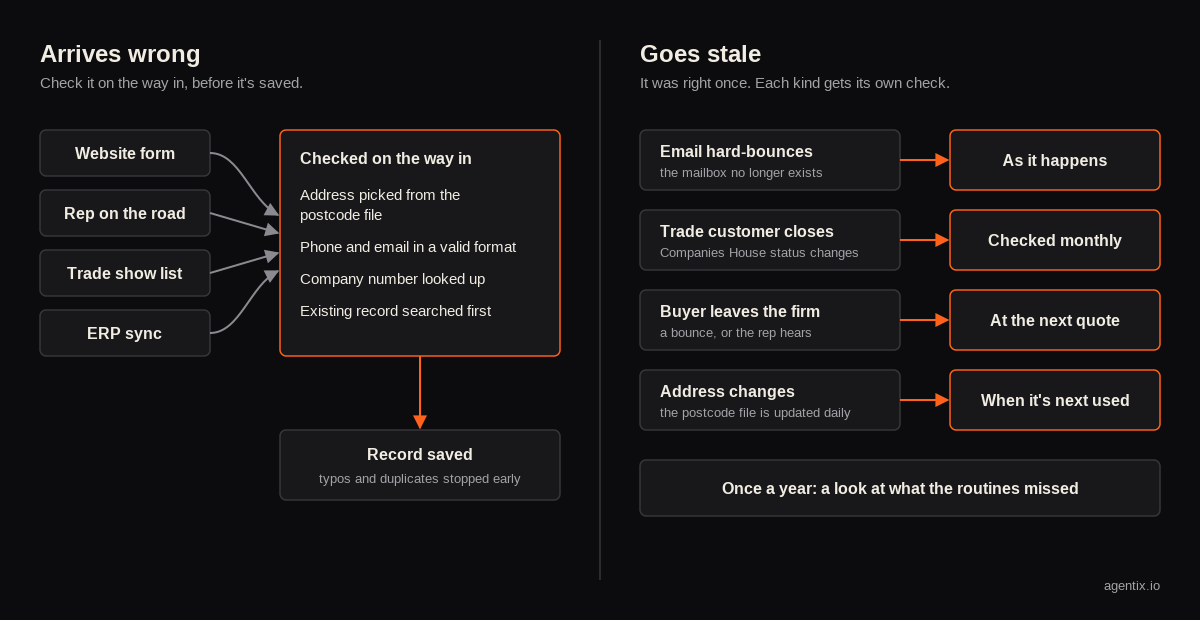
Stopping bad records on the way in
Addresses come from the postcode file. Let people pick the address from a postcode lookup instead of typing it. Royal Mail's Postcode Address File is updated daily and records over 50,000 changes a month on average, according to the PAF Advisory Board, so an address picked from a lookup that uses it is as current as your provider's last update. That gets rid of typed-in mistakes on delivery and invoice addresses.
Fields refuse obvious nonsense. HubSpot has validation rules on every plan. You can check that a phone number is in a valid format, with a default country code, set minimum and maximum lengths, allow numbers only, or make a property hold unique values so the same account number can't be used twice. Unique values have to be switched on when the property is created, so an existing account number field may need replacing. Custom patterns need a Professional or Enterprise subscription. The rules apply when someone edits a record or imports a file, and to forms built in HubSpot's updated form editor. They don't apply to workflows, chatflows, meeting booking pages or forms built in the legacy editor, so it's worth knowing which of your forms are which.
Limited companies get their number. When a new trade account is a limited company, looking it up on Companies House at the point of entry gives you the registered name and company number in one go, and the number gives you something to check its status against later. The data is free, through the website or the API.
The integration looks before it creates. If your ERP or eCommerce platform creates CRM records through an integration, the data integration should search for an existing record first and only create one when nothing comes back. We've written about why company name is a poor field to match on and what to match on instead.
One thing validation won't do is tidy what's already there. HubSpot says so plainly: existing values aren't retroactively formatted. So the rules only help from the day you switch them on, and what's already in there needs one proper clean.
Giving each kind of decay its own routine
Each kind of stale record comes with its own signal, and that signal is your cue to check.
Hard bounces, as they happen. A hard bounce means the email failed for a permanent reason, such as the mailbox no longer existing. HubSpot already drops a contact from future marketing emails after a hard bounce, so your marketing sends are covered, but the record still shows a buyer who may have left. A hard bounce from a buyer's work address is the first sign they've left, and that's worth a task for the account owner to find out who replaced them. Google's own sender guidelines also suggest automatically unsubscribing people after repeated bounces and considering it for people who don't open or read your emails, which matters more if your sales team sends from the same domain as your marketing. We've covered how stale CRM automations can drag down sales email separately.
Closed companies, monthly. Companies House records a status for each company on the register: active, dissolved, in liquidation, in administration, and a few others. If your trade accounts hold their company numbers, a monthly check of the whole book against that status is a small job for a script, and it picks up customers that have been dissolved or gone into liquidation, which your credit controller may not have heard about yet. For a handful of large accounts on credit, Companies House's free Follow service emails you once a filing from one of them has been accepted (you register with an email address first).
People who've left, at the next quote. There's no register of who works where, so this one depends on your own team. The practical moment is the next time someone quotes or takes an order. "Is it still Dave who signs these off?" takes ten seconds on the phone and costs nothing. Make it a field the rep confirms on the quote, and the contact list stays roughly current without anyone running a project.
Addresses, when they're next used. Re-checking every address every year is a lot of effort for records nobody is posting anything to. Check the address against the postcode file when it's about to be used for a delivery, an invoice or a mailing, and fix it then.
Everything else, once a year. A yearly look at what the routines missed is still worth doing: records with no activity for a long time, contacts with no company, accounts nobody owns. If the routines are running, that should be a short review.
What the ICO says about how often
There's no fixed interval in data protection law either. The ICO's guidance on the accuracy principle asks for "every reasonable step" to correct or delete inaccurate personal data, having regard to what it's used for. It says whether you need to update records periodically depends on that use, and that in some cases it's reasonable to rely on people to tell you when their contact details change. It also gives the example of post returned marked "not at this address", which should lead to the record being updated. That's close to the routines above: act on the signals you get, and check harder where the data is used for something that relies on it being current. The ICO notes that this guidance is under review following the Data (Use and Access) Act, so it's worth checking the current version when you set your own routines.
When a big clean is still the right call
There are three times we'd still plan a full clean. The first is before moving to a new CRM or ERP, because you don't want to pay to move duplicates and dead contacts into a new system. We've written about what to clean before a CRM or ERP migration. The second is when you inherit a database, after an acquisition or when a sales team leaves its spreadsheets behind. The third is the first time you put the routines in place, because they stop new mess and do nothing about the old.
What a clean won't do is make the CRM right for good. Reps will still mistype things, and buyers will still change jobs without telling you. What the routines change is how soon somebody finds out: at the next bounce, the monthly check or the next quote. Our data cleansing work does the backlog clean once and sets up these checks, so when a buyer leaves or a customer goes into liquidation, someone hears about it from the CRM before a quote goes to the wrong person or an invoice comes back.
Frequently asked questions
Is once a year often enough for a CRM data cleanse?
A yearly review is fine as a backstop, but it's too slow to be the main method. A buyer who leaves in February and a customer who goes into liquidation in March will both sit in your CRM looking current until the following year. The signals for those changes arrive as they happen, so the useful work happens then, with the yearly look catching whatever slipped through.
Should we delete contacts who hard-bounce?
Not automatically. HubSpot already stops sending marketing email to a contact after a hard bounce, so leaving them in place doesn't harm your marketing sends. For trade accounts, the record may hold order history, notes and quotes that someone will need, so a bounce is a prompt to find the new contact and update the account. Deleting is the right call for contacts with no history and no reason to keep them.
Will validation rules clean up the data we already have?
No. HubSpot's own guidance says existing values aren't retroactively formatted, so the rules only apply to new values and edits made in the CRM, through imports or through forms built in the updated editor. That's why the order matters: put the rules and lookups in place, then do one clean of the backlog. Do it the other way round and new bad records arrive while you're still cleaning the old ones.
Does the Companies House check work for sole traders?
No. Sole traders register with HMRC for Self Assessment and have no Companies House number, so there's no status to check. For sole trader accounts the signals are your own: bounced emails, returned post, unpaid invoices and what the rep hears at the next order. Companies on the Companies House register are the ones you can check automatically, and the check is free.