Why head office gets credit for branch Google Ads leads
Multi-branch merchants often show one head office number on every Google Ads campaign. Here's how branch leads go missing and what we change.
Google Ads puts a phone number on your ads in one of two ways: a call asset you add yourself, or a location asset pulled from your Business Profile. Add either one at account level and every campaign inherits it. On the multi-branch merchant accounts we've seen, that means the Sheffield campaign, the Hull campaign and the Doncaster campaign all show the same head office number, every website enquiry lands in the same central inbox, and the branch that ends up serving the customer never appears anywhere in the numbers.
Google Ads itself copes with this. It counts the call against the campaign that showed the ad, so the campaign report can look perfectly healthy. The trouble starts one step later, in your own systems. The call rings the head office switchboard, gets transferred to Hull, and Hull quotes and books the order. Your phone system says head office took the call. Your CRM says head office logged the enquiry. Hull's sales ledger shows a new trade account with no idea where it came from.
So when the budget conversation comes round, head office looks busy, the branches say the ads don't bring them anything, and both are telling the truth about the reports they can see.
How one number ends up on every campaign
Assets in Google Ads cascade. Anything set at account level applies to every campaign unless a campaign has its own version, and a campaign-level asset overrides the account-level one. Many accounts get a single call asset on day one, the main switchboard number, and nobody revisits it when regional campaigns are added later.
Location assets work the same way, with a twist. Link your Business Profile and Google syncs every listing into the account, head office included. Unless you tell a campaign which locations it may use, it can show any of them. Google's own documentation also says that when an ad shows a specific location alongside a call asset, the call may go to that location's number instead of the call asset's number. So you can have the head office number on some impressions of the Hull campaign and a branch number on others, with no obvious pattern in the report.
None of this is a bug. It is the default behaviour doing exactly what it was set up to do, which is why it tends to go unnoticed for years.
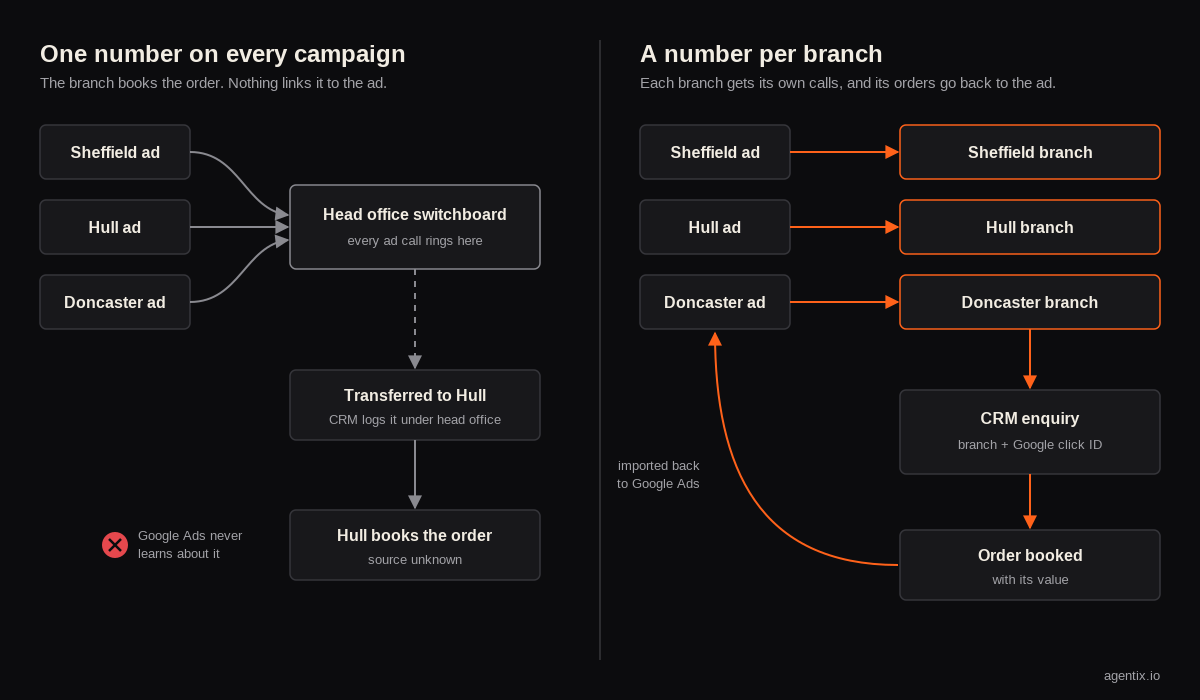
What the same month looks like in four different reports
Here's a hypothetical merchant with a head office trade counter and five branches. One account-level call asset pointing at the switchboard, one enquiry form going to a central inbox, and a regional campaign for each branch area. The figures are made up to show the mechanics, but the shape is one we've seen more than once.
| Report | Head office | Five branches | Total |
|---|---|---|---|
| Google Ads: calls over 60 seconds plus form leads, by campaign area | 34 | 176 | 210 |
| Phone system: where those ad calls were answered | 210 | 0 | 210 |
| CRM: enquiries logged against | 196 | 14 | 210 |
| Orders booked from those enquiries | 21 | 64 | 85 |
| Orders anyone can trace back to the ad | 21 | 9 | 30 |
| Gap: branch orders with no link to the ad | 0 | 55 | 55 |
Google Ads knows that 176 of those leads came from campaigns aimed at branch areas. The phone system and the CRM have no way of knowing that, so they put almost everything on head office. The branches booked 64 orders, but only nine can be traced back, because only 14 enquiries were ever logged against a branch.
If you judge the campaigns on traceable orders, branch areas look like they produced nine sales. They produced 64. A sensible person looking at that report would cut the branch campaigns and put the money into the head office campaign, which is the wrong way round.
The less obvious ways branch leads go missing
The shared number is the big one, but on the accounts we've seen it rarely comes alone. These are the faults we check for on any account with more than one site.
| What you see | What is happening underneath | What it does to your decisions |
|---|---|---|
| Every ad call rings the head office switchboard | One call asset set at account level, inherited by every regional campaign | Branches never know which calls came from ads, so they can't say which ones turned into orders |
| A Sheffield ad showing the Leeds number | Location assets synced at account level with no location group on the campaign, so any listing can appear | Calls go to the wrong branch, get transferred or lost, and the conversion lands on a campaign that didn't earn it |
| Calls from the Maps listing never show as conversions | Calls made from a Business Profile listing can only be tracked as Google Ads conversions in the US and Canada | UK branches with busy Maps listings look quieter in Google Ads than they are on the phone |
| Store visits flat for your busiest branch | Store visits are modelled and need every location verified in Business Profile; nearby branches can also swap visits | A branch can be under-credited because of a listing problem, not a performance problem |
| All form enquiries filed under head office | One form, one inbox, no branch field, and the click ID never stored against the enquiry | You can't import branch sales back into Google Ads, so bidding learns nothing from them |
The Maps point catches people out. A trade customer searches, sees the ad, taps through to the branch listing and calls from there. In the UK, Google Ads can count the tap on the call button as a local action, but it can't count the call as a conversion. A tap tells you someone meant to ring. It doesn't tell you they got through, or what they wanted.
Store visits deserve a word too. Google models them from aggregated data, so they're an estimate, and Google's own store report warns that when two stores are close together, someone can see an ad for one and walk into the other. They're useful for spotting whether a branch gets any footfall from ads at all. They aren't a branch sales figure, and we wouldn't let anyone set a branch budget from them.
What we change
The fix is mostly about giving each branch its own route through the account, then making sure the branch's sales can find their way back.
We start with the Business Profile, because everything else depends on it. Every branch needs its own verified listing with the right number, and the listings need labels Google Ads can filter on, one per branch or region. Then each regional campaign gets a location group built from those labels, so the Hull campaign can only show Hull. Head office gets its own campaign and its own group, so it stops appearing in branch areas by accident.
Calls come next. Each regional campaign gets a campaign-level call asset with that branch's number, which overrides the account-level switchboard. Call reporting stays on, so Google forwarding numbers track the calls, with a minimum call length that filters out wrong numbers without throwing away quick trade orders. Google Ads records the start time and duration of each call, and the caller's number on calls over 15 seconds, so a branch can match ad calls against its own call log when a question comes up. We cover the detail of choosing a sensible call length in our lead and enquiry tracking work.
Forms are the part that takes the most care. The enquiry needs a branch on it, either chosen by the customer or worked out from their postcode, and it needs the Google click ID stored against the record when it's created. With both in place, orders the branch books can go back into Google Ads as offline conversions with a real value, and if your campaigns bid on that value, bidding learns that a Hull trade account is worth more than a one-off enquiry. We've written separately about feeding qualified CRM deals back into Google Ads when the sales cycle runs to weeks.
None of it works unless the branches log what happens. If a branch takes a call and books the order on a paper pad, the best setup in the world won't see it. Part of the job is agreeing with branch managers what gets logged and keeping it to one or two fields, because they're busy and a long form won't get filled in. Trade customers phoning the branch after browsing online is normal behaviour, and we've looked at why trade customers look up products online and still phone the branch in more detail.
What it looks like when it's working
You can open the Google Ads report, pick the Hull campaign and see calls that rang Hull, enquiries logged against Hull and orders Hull booked from them, with values. The branch manager can see the same calls on their side. When head office and the branches compare notes, they're looking at the same numbers, and the budget conversation is about which areas make money rather than whose report is right.
Frequently asked questions
Do we need a separate Google Ads account for each branch?
No. One account with a campaign per branch area, a location group per campaign and campaign-level call assets is enough for a merchant with a handful of branches. Separate accounts make budget sharing and reporting harder, and they don't fix the inbox and CRM side, which is where the branch leads in the example above went missing.
Can Google Ads track calls made from our Google Business Profile listing?
Not as conversions in the UK. Google's documentation says call tracking from a Business Profile listing needs the listing to be based in the United States or Canada. In the UK you can see taps on the call button as local actions, but that counts the tap, not whether a conversation happened or how long it lasted.
Are store visits accurate enough to judge a branch?
They're an estimate, so we use them as a sense check and keep sales figures for the sales ledger. Google models them from aggregated data and needs every location verified before it will report them. Branches close together can also pick up each other's visits, so a branch-by-branch comparison can mislead you if you take the numbers literally.
Will splitting location assets reduce how often our ads show?
Your ads keep showing as before. What changes is the address and number on them: a campaign limited to its own branch shows that branch, which is the point. If a branch area currently relies on head office being shown, give head office its own campaign so that coverage doesn't disappear.